
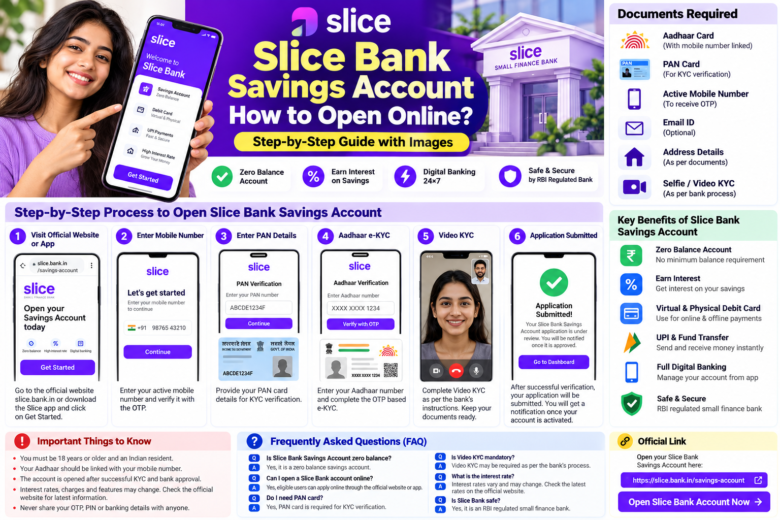
How to Open a Slice Bank Savings Account Online? Complete Step-by-Step Guide
Are you looking for a convenient way to open a savings account using your mobile phone? Slice Bank Savings Account may be an option worth considering. Slice Small Finance Bank provides digital banking services, and eligible customers can apply for a savings account online.
In this guide, you will learn how to open a Slice Bank Savings Account, which documents may be required, how to complete KYC verification, and what you should check before applying.
What Is a Slice Bank Savings Account?
Slice Small Finance Bank is an Indian bank offering savings accounts and digital banking services to eligible customers.
Depending on your account eligibility and the bank’s current terms, you may be able to deposit money, transfer funds, earn interest on eligible balances, and access other banking facilities.
Try it with my code &KUNAL21924 and get ₹500 on your first payment.
https://slice.bank.in/t?c=toojTzZ&ic=KUNAL21924
Documents Required to Open a Slice Bank Account
Before starting your application, keep the following information ready:
- An active mobile number.
- PAN Card.
- Aadhaar Card or another identification method accepted by the bank.
- Address details.
- Email address, if requested.
- A smartphone with an internet connection.
- Any additional documents or information requested during KYC verification.
If you use Aadhaar OTP-based e-KYC, your Aadhaar must generally be linked to an accessible mobile number. The bank may request additional information depending on your application.
How to Open a Slice Bank Savings Account Online
Step 1: Visit the Official Slice Bank Website
Open the official Slice Bank Savings Account page:
https://slice.bank.in/t?c=toojTzZ&ic=KUNAL21924
Follow the available instructions to start your application. If directed to the official Slice app, download it only from an official app store or an official Slice website link.
Step 2: Enter Your Mobile Number
Enter your active mobile number and verify it using the OTP sent to you, if requested.
Never share your OTP with another person. Only enter it into the official application or verification page.
Step 3: Provide Your PAN Card Details
Enter your PAN details or complete the PAN verification process shown in the application.
Make sure your name and other information match your official documents. Incorrect information may delay the application.
Step 4: Complete Aadhaar and KYC Verification
Follow the bank’s instructions to verify your identity. Depending on the process offered to you, this may involve Aadhaar e-KYC, DigiLocker, CKYC, or another approved verification method.
Provide accurate address and personal details. Only submit documents through the bank’s official and secure channels.
Step 5: Fill In Your Personal Information
Complete the application form with the required information, such as:
- Full name and date of birth
- Residential address
- Occupation and income details, if requested
- Other information required by the bank
Review the information carefully before continuing.
Step 6: Complete Video KYC, If Required
The bank may ask you to complete Video KYC as part of its identity verification process.
Use a stable internet connection and follow the on-screen instructions. Keep your original documents available if requested by the bank representative.
Video KYC requirements may vary according to the verification method and applicable banking rules.
Step 7: Submit Your Application
Review your details and submit the application.
The bank will verify your information and decide whether to approve the account. Follow any additional instructions provided during the application process.
Once your account is approved and activated, follow the bank’s instructions to access your account details and available banking services.
Important: Submitting an application does not guarantee account approval. The account must pass the bank’s verification process.
Key Benefits of a Slice Bank Savings Account
1. Zero Minimum Balance Requirement
Slice’s savings account information states that there is no minimum balance requirement. Check the latest official terms to understand any other applicable fees or conditions.
2. Online Account Opening
Eligible applicants can begin the account-opening process online instead of relying entirely on a branch visit.
3. Interest on Savings
Eligible savings balances may earn interest according to the bank’s applicable rates and terms.
Interest rates can change, so check the latest rates before opening an account.
Official rates page: https://slice.bank.in/rates-and-pricing/
4. Digital Banking Facilities
Depending on the services available for your account, you may be able to check your balance, transfer money, and manage other banking activities digitally.
5. Debit Card Facilities
Virtual or physical debit card availability, fees, and features may vary. Check the bank’s current terms before ordering or using a card.
Important Things to Know Before Applying
- Check the bank’s current age, residency, and eligibility requirements.
- Keep your PAN and other required identification documents ready.
- Complete all required KYC verification steps.
- Review applicable transaction limits and account conditions.
- Check current interest rates, debit card fees, and other charges.
- Never share your OTP, UPI PIN, ATM PIN, or banking password with anyone.
Eligibility requirements and verification methods may change, so use the official website for the latest information.
Is Slice Bank Savings Account Safe?
Slice Small Finance Bank is an RBI-regulated small finance bank. However, you should always take precautions when opening and using any digital bank account.
Use the official Slice website or app, keep your login credentials secure, and avoid links sent by unknown people.
Never share your OTP, PIN, password, or other confidential banking information with anyone claiming to be a bank representative.
Frequently Asked Questions (FAQ)
1. Is Slice Bank Savings Account a zero-balance account?
According to Slice’s published savings account information, there is no minimum balance requirement. Check the latest terms for other charges and conditions.
2. Is PAN Card required to open a Slice Bank account?
PAN information is generally required as part of the account’s KYC process. Keep your PAN Card ready and follow the bank’s instructions.
3. Can I open a Slice Bank account using my mobile phone?
Eligible applicants can use the official digital application process on a compatible mobile phone.
4. Is Video KYC mandatory?
Video KYC may be required depending on the verification process offered by the bank and the applicable requirements. Follow the instructions displayed during your application.
5. What is the interest rate on a Slice Bank Savings Account?
Interest rates can change. Check the current rate on the official page:
https://slice.bank.in/rates-and-pricing
6. How long does account activation take?
Processing time may vary depending on the bank’s verification process and whether additional information is required. Check your application status through the official channel.
Conclusion
Opening a Slice Bank Savings Account online can be convenient for eligible applicants. Start by visiting the official website, provide your details, complete PAN and identity verification, and follow the bank’s instructions to finish KYC.
Before applying, review the latest account conditions, interest rates, charges, and eligibility requirements.
Apply or learn more: https://slice.bank.in/savings-account
Disclaimer: This article is for informational purposes only and is not an official Slice Bank publication. Account features, eligibility criteria, interest rates, fees, and verification procedures may change. Always confirm the latest details with the bank before applying.