
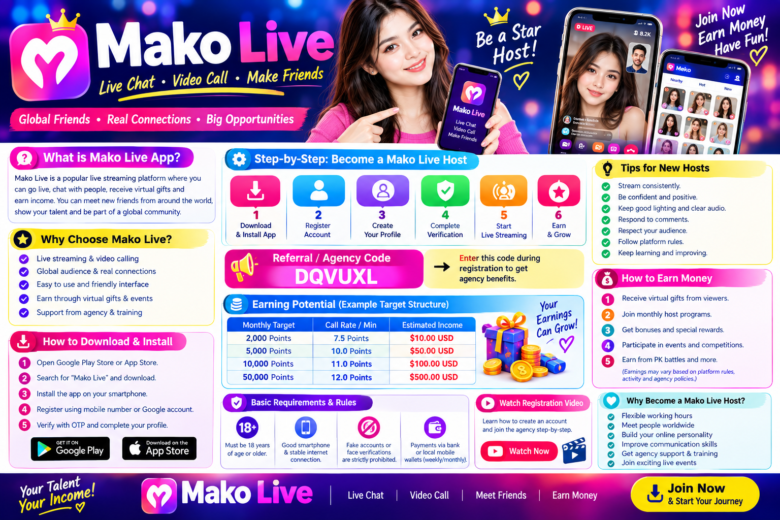
Mako Hosting – Host Registration, Earnings, App Download & Complete Guide 2026
Mako Hosting is designed for creators and mobile hosts who want to connect with people through audio calls, video calls, and text messaging. With flexible working hours and multiple communication features, hosts can use their smartphones to interact with users from different countries.
In this complete Mako Hosting guide, you will learn how to download the Mako app, create your account, enter the hosting invitation code, complete face verification, set up your host profile, understand the listed earning structure, and learn about available withdrawal methods.
Important: Earnings, call volume, bonuses, withdrawal limits, and payment methods may vary depending on account activity, location, platform policies, and applicable terms.
Start Earning with Mako Hosting
Mako Hosting provides an opportunity for creators and mobile hosts to work through audio calls, video calls, and text messages.
Hosts can generally choose their active hours according to their availability. The platform also provides tools for profile setup and communication with users.
Key Features of Mako Hosting
- Audio calling
- Private video calling
- Text messaging
- Flexible working hours
- Host profile setup
- Global user interaction
- Hosting support
- Multiple withdrawal/payment options
Mako App Download
To start the registration process, download the Mako application using the available Android or iOS option below.
Android APK
Download Mako for Android:
https://web.matchu.app/new/share.html?gender=1&code=DQVUXL&af_code=&user_id=233884953&countryCode=IN&bundleId=com.matchu.machat&appName=Mako&appStore=https%3A%2F%2Fapps.apple.com%2Fapp%2F6444004401
iOS App Store
Download Mako for iPhone/iOS:
https://web.matchu.app/new/share.html?gender=1&code=DQVUXL&af_code=&user_id=233884953&countryCode=IN&bundleId=com.matchu.machat&appName=Mako&appStore=https%3A%2F%2Fapps.apple.com%2Fapp%2F6444004401
How to Register for Mako Hosting
The Mako hosting registration process can be completed from your smartphone. Follow these steps carefully.
Step 1: Download the Mako App
First, download and install the Mako application on your Android or iOS smartphone.
Use the download link provided above.
Step 2: Create Your Account
Open the application and create a new account using an available registration method such as your mobile number or Gmail, depending on the options shown in the app.
Make sure that the information you provide is accurate.
Step 3: Enter the Hosting Invitation Code
During the registration or hosting setup process, enter the following hosting invitation code:
Mako Hosting ID: DQVUXL
Check the code carefully before submitting it.
Step 4: Complete Face Verification
After registration, complete the required face verification process inside the application.
Follow the instructions shown on the screen and use a clear image of your real face if verification is requested.
Once the required verification steps are completed, you can continue with your host profile setup.
Mako Host Profile Setup
Your profile can play an important role in attracting incoming calls and messages.
A professional profile should include:
- A clear and high-quality profile photo
- An attractive but honest bio
- Appropriate profile information
- Regular activity
- Good-quality internet connection
- Proper microphone and camera permissions
Avoid using misleading information or someone else’s photos.
Mako Host Video Tutorials
If you are new to Mako Hosting, video tutorials can make the registration and profile setup process easier.
1. How to Register on Mako
Watch the registration tutorial to understand the basic signup and hosting setup process.
YouTube Tutorial:
https://www.youtube.com/watch?v=jkR2xThOapM
2. How to Setup Your Mako Profile
Learn how to set up your profile, upload suitable pictures, and create an engaging bio.
Profile Setup Tutorial:
https://youtube.com/shorts/9Zo4WUiKIcs
3. What to Do If Calls Don’t Come?
If you are receiving fewer incoming calls, check your app permissions, internet connection, profile quality, and active hours.
Low Call Problem Tutorial:
https://youtube.com/shorts/m54FQrhf8Yk
Mako Hosting Earning Structure
Mako may provide different earning opportunities through match calls, video calls, and text messaging.
The following figures are based on the earning structure provided for this hosting information and should be treated as indicative rather than guaranteed income.
Match Call Earnings
Hosts can earn coins from incoming private match calls according to the applicable platform rate.
Listed Rate: 0.60 Coins / 20 seconds
The actual amount a host receives can depend on the platform’s current conversion and payout rules.
Video Call Earnings
Private one-to-one video calls and virtual gifts may provide another earning opportunity for hosts.
Listed Rate: 7.5 to 25 Coins per minute
Actual earnings depend on call duration, incoming calls, user activity, applicable rates, and other platform conditions.
Text Message Earnings
Hosts may also receive coins for eligible text-message interactions.
Listed Rate: 0.20 Coins per SMS
Text-message earnings can vary according to the platform’s rules and eligible interactions.
How to Increase Your Mako Host Activity
There is no guaranteed number of calls or income, but hosts can improve their overall profile quality and availability by following some basic practices.
1. Use a Clear Profile Picture
Use a bright, clear, and genuine profile picture. Avoid blurry images or heavily edited photos.
2. Write an Attractive Bio
Your bio should be friendly, simple, and honest. Let users know what type of conversations you enjoy.
3. Stay Active
Regular activity can help you remain available to users. Choose suitable active hours based on your availability.
4. Check App Permissions
Make sure the Mako app has the necessary microphone, camera, notification, and network permissions.
5. Use a Stable Internet Connection
A stable internet connection can help reduce problems during audio and video calls.
6. Respond Professionally
Be polite and respectful when communicating with users. Follow Mako’s community and hosting policies.
Mako Hosting Payout & Withdrawal
According to the provided hosting information, the listed minimum withdrawal amount is:
Minimum Payout: $20 USD / 2,000 Coins
The settlement schedule and withdrawal availability can vary according to the current platform rules and host account.
Before requesting a withdrawal, always check the latest balance, eligibility requirements, verification requirements, and available payment methods inside the application or through the applicable hosting support channel.
Supported Payment Methods
The provided hosting information lists different payment options depending on the country.
India
Potential payment options include:
- UPI
- Google Pay
- PhonePe
- Paytm
- USDT
- TRC20/BEP20 wallets
- Local bank transfer
Bangladesh
Potential options include:
- bKash
- Nagad
- Rocket
- USDT
- TRC20/BEP20 wallets
- Local bank settlement
Pakistan
Potential options include:
- JazzCash
- Easypaisa
- USDT
- TRC20/BEP20 wallets
- Local bank account
International / Worldwide
Depending on availability and eligibility, the provided information lists:
- USDT
- TRC20/BEP20 wallets
- Binance
- Bybit
- PayPal
- Epay
Payment availability can vary by country and may change according to platform policies and local regulations.
Mako Hosting Support
If you need help with host registration, profile setup, or general hosting assistance, you can use the support channels provided by the hosting team.
Telegram
WhatsApp Channel
WhatsApp Support
Frequently Asked Questions About Mako Hosting
What is Mako Hosting?
Mako Hosting is a hosting opportunity for creators and mobile hosts who communicate with users through audio calls, video calls, and text messages.
How do I register for Mako Hosting?
Download the Mako app, create your account, enter the hosting invitation code DQVUXL where required, and complete the necessary verification process.
What is the Mako Hosting ID?
The hosting invitation code provided for this registration guide is:
DQVUXL
Is face verification required?
Face verification may be required during the account or hosting activation process. Follow the verification instructions displayed in the Mako application.
How much can I earn from Mako?
Income is not fixed or guaranteed. It can depend on incoming calls, call duration, messages, gifts, activity, applicable rates, and platform policies.
What is the minimum withdrawal amount?
The provided hosting information lists $20 USD / 2,000 Coins as the minimum payout amount. Always verify the current requirement before making a withdrawal request.
Can I work from home?
Mako hosting can be operated using a smartphone and an internet connection. Hosts can choose their available working hours, subject to platform requirements.
What should I do if I don’t receive calls?
Check your profile picture and bio, app permissions, internet connection, notification settings, and active hours. You can also review the low-call troubleshooting tutorial.
Final Words
Mako Hosting can be an option for creators and mobile hosts who want to communicate with global users through video calls, audio calls, and text messages.
To get started, download the Mako application, register your account, enter the hosting invitation code DQVUXL, complete the required verification, and set up a professional host profile.
Remember that host earnings and call availability are not guaranteed and may vary depending on user activity, location, platform rules, and your own activity level. Always follow Mako’s latest hosting, community, verification, and withdrawal policies.
Mako Hosting ID: DQVUXL
Start your Mako Host registration today and build your profile professionally.