
Sela Live (Emma Live App) Host Registration – Complete Guide to Start Hosting
If you are looking for a simple way to get started as a live-streaming host, Sela Live, also known as the Emma Live App, provides a platform where eligible hosts can connect with users through live and video interactions.
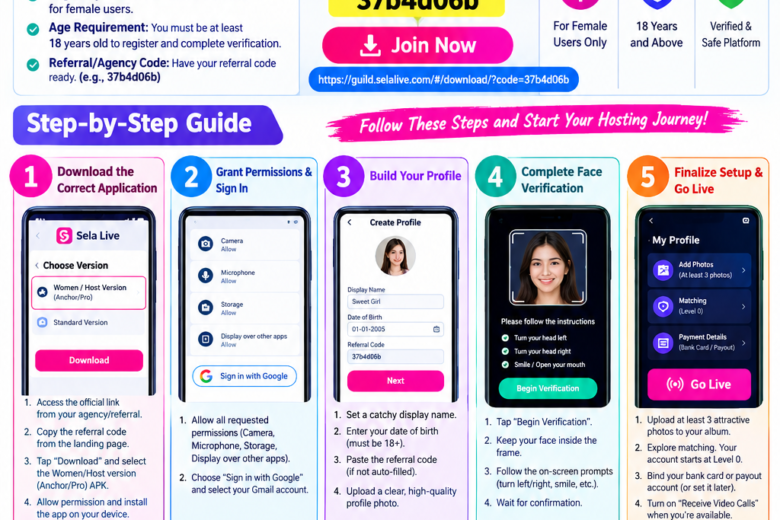
This complete guide explains the Sela Live host registration process, including downloading the correct host application, entering the invitation code, creating your profile, completing face verification and preparing your account for hosting.
Important: Availability, eligibility, verification requirements, payout methods and earning opportunities may vary by region and may change according to the platform’s current policies. Always follow the instructions shown in the official app or registration page.
Sela Live Host Invitation Code
If you are registering through the referral/agency link provided with this guide, the invitation code is:
Bind Invitation Code: 37b4d06b
Join Sela Live Host Registration
The invitation code may be required during registration. Keep it available before starting the signup process.
What Is Sela Live / Emma Live App?
Sela Live, sometimes referred to as the Emma Live App, is a live-streaming and communication platform that allows users and hosts to interact through online features such as video calls and other social communication tools.
For eligible hosts, the platform can provide an opportunity to build a profile, interact with users and participate in the platform’s hosting system.
If you are planning to become a host, completing your profile and verification correctly is an important part of the registration process.
Who Can Register as a Sela Live Host?
Before starting the registration process, check the basic requirements.
Basic Requirements
- The host version described here is intended for female users.
- You must be 18 years of age or older.
- You need a compatible Android device if the host application is distributed through an APK.
- You may need an agency or referral/invitation code.
- You need a working Google account if Google sign-in is offered.
- You should have a clear profile photograph.
- You must be able to complete the platform’s identity/face verification process.
Requirements can change, so check the latest requirements displayed by the official registration system before proceeding.
Step-by-Step Sela Live Host Registration
Step 1: Open the Host Registration Link
First, open the official host registration or onboarding link provided for your registration.
Sela Live Host Link
Join Sela Live Host Registration
Keep your invitation code ready:
37b4d06b
If the code is not automatically added during registration, you can enter it manually when the application asks for it.
Step 2: Download the Correct Host Application
The host version may be different from the standard user application.
After opening the registration page:
- Tap the Download option.
- Look for the appropriate Women/Host or host/anchor version.
- Download the application offered through the registration process.
- Install the application on your compatible device.
- Follow the instructions displayed by the platform.
Avoid downloading APK files from unknown third-party websites. Whenever possible, use the official registration or distribution source provided by the platform or your agency.
Step 3: Allow Required App Permissions
After installing and opening the host application, you may be asked to provide certain permissions.
Depending on the app version and your device, these can include:
- Camera
- Microphone
- Storage or photos/media
- Notifications
- Other permissions required for calling or live features
Only grant permissions that are requested by the official application and that you are comfortable providing.
These permissions may be necessary for video calls, audio communication, profile photos and other host features.
Step 4: Sign In With Google
If the application provides Google sign-in, select:
Sign in with Google
Then choose the Google account you want to associate with your hosting account.
Make sure you use an account that you can access in the future because it may be associated with your profile.
Step 5: Create Your Sela Live Host Profile
Once you have successfully signed in, you may need to create your host profile.
A complete profile can help users understand who they are interacting with.
Add Your Display Name
Choose a simple and memorable display name.
For example:
- Your first name
- A professional nickname
- A unique host name
Avoid using misleading information.
Add Your Date of Birth
Enter your actual date of birth as requested by the platform.
The registration process described here requires hosts to be 18 or older.
Enter the Invitation Code
If the invitation code has not already been applied, enter:
37b4d06b
Upload a Profile Photo
Use a clear, high-quality profile photo that follows the platform’s community guidelines.
A good profile image should be:
- Clear
- Well lit
- Easy to recognize
- Appropriate for the platform
- Free from misleading edits
Step 6: Complete Face Verification
Face verification is an important part of the account verification process.
After opening the verification section:
1. Start Verification
Tap the verification or Begin Verification button.
2. Position Your Face
Keep your face clearly visible inside the frame.
Make sure:
- Your face is well lit.
- Your camera lens is clean.
- You are not heavily covering your face.
- Your device remains steady.
3. Follow the On-Screen Instructions
The verification system may ask you to perform simple actions such as:
- Looking left
- Looking right
- Smiling
- Opening your mouth
- Moving your face according to the instructions
Follow the instructions displayed on your screen.
4. Wait for Confirmation
After completing the process, wait for the system to process the verification.
If verification fails, check your lighting, camera permissions and positioning before trying again.
Step 7: Complete Your Host Profile
After verification, continue setting up your profile.
You may be able to add additional photos and profile information.
Adding several clear and appropriate photos can make your profile more complete.
Remember to follow the platform’s rules regarding profile images and content.
Step 8: Start Using Host Features
After completing registration and verification, explore the available host features.
Depending on the current version of the application, you may find options related to:
- Video calls
- Matching
- Online status
- Profile management
- Call settings
- Earnings or rewards
- Withdrawal/payout settings
Your available features may depend on your account, location and platform policies.
Sela Live Host Earning Tips
Joining a hosting platform does not guarantee a specific income. Your actual earnings can depend on factors such as user activity, completed interactions, platform rules, bonuses and payout policies.
However, these general practices can help you manage your hosting activity effectively.
1. Stay Active When You Are Available
If you are available to receive calls, keep the relevant receiving option enabled.
When you are unavailable, turn it off to avoid unnecessary missed calls.
2. Respond to Calls Promptly
When you are online and available, try to respond to incoming calls within a reasonable time.
Repeatedly missing calls may affect your activity statistics depending on the platform’s rules.
3. Maintain a Complete Profile
Keep your profile photo and other information updated.
A clear profile can make it easier for users to understand your account.
4. Follow Community Guidelines
Always follow the platform’s content, communication and safety rules.
Do not share sensitive personal information with strangers.
5. Check Your Earnings and Payout Section
If your account has an earnings or payout section, review the available information carefully.
Before requesting a withdrawal, check:
- Minimum withdrawal amount
- Supported payout methods
- Processing time
- Applicable fees
- Account verification requirements
These conditions can change, so rely on the latest information shown inside the official platform.
Common Sela Live Host Registration Problems
Face Verification Failed
If face verification does not work:
- Move to a well-lit location.
- Clean your camera lens.
- Keep your entire face inside the frame.
- Follow the movement instructions carefully.
- Check whether camera permission is enabled.
- Try again after a short interval.
Invitation Code Is Not Working
If 37b4d06b does not work:
- Check that the code has been entered correctly.
- Make sure there are no extra spaces.
- Check whether the code has already been applied automatically.
- Contact the agency or referral source that provided the code.
Calls Are Not Coming
If your account is active but you are not receiving calls, check:
- Whether your online/receive-call status is enabled.
- Whether your profile is complete.
- Whether your internet connection is stable.
- Whether the account has completed verification.
- Whether there are any account restrictions or platform-specific requirements.
Do not assume that low call activity guarantees a particular earning level; user demand and platform algorithms can vary.
Sela Live Host Registration – Quick Checklist
Before you start hosting, make sure you have completed the following:
✅ 18+ eligibility requirement
✅ Correct host application installed
✅ Google account connected
✅ Invitation code entered if required
✅ Profile name completed
✅ Profile photo uploaded
✅ Face verification completed
✅ Additional profile information completed
✅ Payout settings reviewed
✅ Host/call availability enabled when you are online
Frequently Asked Questions
What is the Sela Live App?
Sela Live is a live communication platform that can provide features such as video calls and social interaction. The host version allows eligible hosts to participate in the platform’s hosting system.
Is Sela Live also called Emma Live?
The platform is sometimes referred to as the Emma Live App in host-registration and promotional contexts. App names and versions can change, so check the current application information provided by the official registration source.
What is the Sela Live invitation code?
The invitation code provided for this registration guide is:
37b4d06b
Who can register as a host?
The host process described in this guide is intended for eligible female users aged 18 or above. Always verify the latest eligibility requirements on the official registration page.
Is face verification required?
The registration process described in this guide includes face verification. The exact verification steps may vary depending on the current application version and regional requirements.
Can I withdraw my earnings?
If your account is eligible for earnings and withdrawals, available payout methods and minimum withdrawal requirements will be displayed by the platform. Check the current payout section before making a withdrawal request.
How can I get more calls?
Maintain a complete profile, stay active when available, respond appropriately to incoming calls and follow the platform’s rules. Call volume is not guaranteed and can vary based on user demand and other platform factors.
Final Words
Creating a Sela Live (Emma Live) host account can be straightforward when you follow the registration steps carefully.
Start by opening the host registration link, download the correct application, sign in, create your profile, enter the invitation code when required and complete the face verification process.
Once your account is approved, review the available host and payout features and follow the platform’s latest rules.
Sela Live Host Invitation Code
37b4d06b